The Food Lion app puts the whole store in your pocket, from your MVP card and weekly ad to digital coupons, Shop & Earn rewards, and grocery pickup or delivery. This free app makes it easier to plan your shopping, access savings and order groceries from your phone. In this guide, you’ll learn how to download the Food Lion app, set it up, log in, use its main features, and fix common problems when it’s not working.
What Is the Food Lion App?
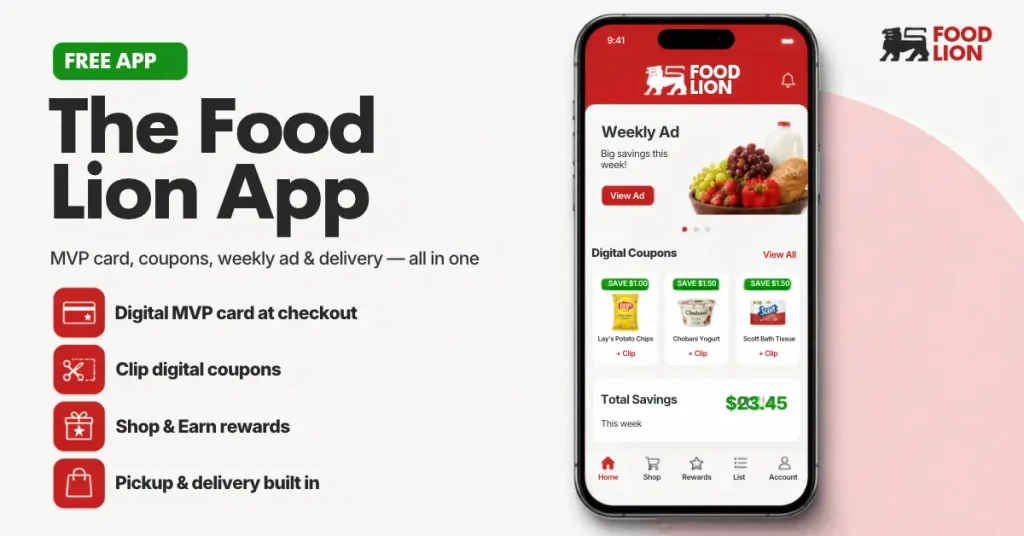
The Food Lion app is the official mobile app from Food Lion, free for iPhone and Android. It’s built around saving you money and time: you can scan your digital MVP card at checkout, clip digital coupons, browse your store’s weekly ad, activate Shop & Earn rewards, build a shopping list and order groceries for pickup or delivery. Food Lion has combined its features into one app, so the main Food Lion app now also handles the online ordering that used to sit in a separate To Go app.
Here’s the app specification:
| Detail | Food Lion App |
|---|---|
| Developer | Food Lion, LLC |
| Platforms | iPhone/iPad (iOS) and Android |
| Price | Free |
| Category | Shopping / Grocery |
| Main features | Digital MVP card, weekly ad, digital coupons, Shop & Earn, shopping list, recipes, pickup & delivery |
| Account needed | Free MVP account |
| Login | Email and password, or Face ID on iPhone |
How to Download the Food Lion App
Downloading the Food Lion app is quick and free. The safest place to get it is the official app store for your phone, not a third-party APK site:
- iPhone or iPad: Open the App Store, search Food Lion, and tap download. You can also get it from the official Food Lion app on the App Store.
- Android: Open the Google Play Store, search “Food Lion,” and tap install, or use the official Food Lion app on Google Play.
The app is free to download and use, there’s no membership fee. Once it’s installed, you’re ready to set it up.
How to Set Up and Log In to the Food Lion App
Setting up the app takes a couple of minutes:
- Open the Food Lion app and sign in to your account, or create a free MVP account if you’re new.
- Link your existing MVP card or register for a free MVP account if you don’t have one.
- Select your preferred store to see local deals, prices and the weekly ad.
- Once setup is complete, explore digital coupons, Shop & Earn rewards and grocery ordering.
You may be able to enable Face ID on supported iPhones for quicker sign-in, depending on your app settings.
Food Lion App Features
Here’s what you can do in the app:
- Digital MVP card: Scan your card straight from your phone at checkout, or save it to your phone’s wallet.
- Weekly ad: Browse your local store’s weekly ad and add sale items to your list.
- Digital coupons: Clip coupons to your MVP card, sorted by category, value or expiration.
- Shop & Earn: Activate and track your monthly Shop & Earn rewards.
- Shopping list: Build a list from clipped coupons, recipes and the ad, so you don’t forget anything.
- Recipes: Find meal ideas and add the ingredients to your list.
- Pickup and delivery: Order groceries through Food Lion To Go for pickup or delivery.
- Past purchases: Reorder items you buy often from your history.
- Product info: See wellness details like Guiding Stars and gluten-free or dairy-free indicators.
- Savings tracker: View your total MVP savings in one place.
Is the Food Lion App Free?
Yes. The Food Lion app is completely free to download and use, with no subscription or membership fee. You do need a free MVP account to unlock coupons and Shop & Earn but that’s free too. Like most shopping apps, it needs an internet connection for most features to work.
Food Lion App Not Working? How to Fix It
This is the most common thing people search for so let’s cover it properly. If the Food Lion app isn’t working, whether login fails, the screen won’t load, coupons won’t clip checkout won’t go through, or you see a customer is not allowed to shop message, run through these steps:
- Update the app: Check the App Store or Google Play for an available update.
- Close and reopen the app: Fully close Food Lion and launch it again.
- Check your internet connection: Try switching between Wi-Fi and mobile data.
- Sign out and sign back in: If you’re having account or coupon issues, try signing in again.
- Restart your phone: Restarting can help resolve temporary device-related problems.
- Reinstall the app: If the other steps don’t work, reinstall Food Lion and log in again.
If you’re stuck at checkout or seeing an error code it’s usually a temporary glitch. Try again after updating and restarting. A “customer is not allowed to shop” or blocked message often clears up after the app updates or the stores system refreshes if it continues, contact Food Lion customer service.
Why Is the Food Lion App Down?
Sometimes the Food Lion app is down for everyone at once, often alongside the website, because of maintenance or a technical issue on Food Lion’s end rather than your phone. When that happens, the troubleshooting steps above won’t help, the service simply has to be restored on Food Lion’s side, and there’s no fixed time, though most outages are resolved within hours.
Here’s how to tell whether it’s you or a system-wide outage:
- Try the Food Lion website. If the site is down too, it’s a system-wide issue, not your phone.
- Check for an in-app or on-site message. Food Lion usually posts a notice when its systems are temporarily unavailable.
- Wait and retry. For a genuine outage, waiting is the only fix. In the meantime you can still shop in store, and online orders may be available through Food Lion’s delivery partners.
Once service is back, open the app again and sign in as normal.
Food Lion App vs Website
The app and the Food Lion website share the same account and savings, so your MVP card, coupons and Shop & Earn work on both. The difference is convenience: the app is faster for in-store use, scanning your card, clipping coupons on the go, showing your list by aisle, while the website can be easier for browsing on a computer. Use whichever fits the moment, your savings follow your account either way.
Tips to Get the Most from the Food Lion App
- Link your MVP card so every trip earns rewards and applies coupons.
- Turn on Face ID (iPhone) for faster login.
- Clip coupons and build your list before you shop.
- Activate Shop & Earn at the start of each month in the app.
- Keep the app updated to avoid glitches.
Frequently Asked Questions
What is the Food Lion app?
It’s Food Lion’s free official app for iPhone and Android, with your digital MVP card, weekly ad, coupons, Shop & Earn, shopping list and online ordering.
How to download the Food Lion app?
You can download Food Lion in the App Store (iPhone) or Google Play (Android) and install it. It’s free.
How do I log in to the Food Lion app?
Open the app and sign in with your email and password, or use Face ID on iPhone once it’s enabled.
Why is the Food Lion app not working?
Usually an outdated app, a weak connection, or a login glitch. Update, restart, check your connection, and sign out and back in. If it’s down for everyone, it may be a temporary outage.
Why is the Food Lion app down and when will it be back up?
A chain wide outage is usually maintenance or a technical issue on Food Lion’s side, not your phone. There’s no fixed time, but most are resolved within hours. Check the website to confirm it’s system-wide, then wait and retry.
Is the Food Lion app the same as Food Lion To Go?
Yes. Food Lion combined them, so the main app now handles coupons, the MVP card and online ordering for pickup or delivery.
Can I use the Food Lion app for pickup and delivery?
Yes. You can order groceries for pickup or delivery right in the app.
Does the Food Lion app have the weekly ad?
Yes. Select your store and the app shows your local weekly ad and MVP prices.
Final Thoughts
The Food Lion app is worth having if you shop there at all: it’s free, it keeps your MVP card and coupons on your phone and it ties together the weekly ad, Shop & Earn and online ordering in one place. Set it up once, link your MVP card, turn on Face ID and you’ll clip coupons and save without carrying a card.
If it ever stops working, the fixes above handle most problems, and a system outage just needs a little patience. Keep the app updated and it’ll quietly save you money on every trip.